How to Cancel Amazon Subscribe & Save (Diapers & More, 2026)
To cancel an Amazon Subscribe & Save product subscription, go to Account → Memberships and subscriptions → Subscribe & Save → Your Subscriptions, choose Edit on the item, then Cancel subscription. Do it before the next box is already on its way — and note that ending Prime doesn’t stop Subscribe & Save.
Last verified: 2026-10-01 · Amazon Help: Cancel Subscribe & Save · Manage Subscriptions
Top 10 products people commonly subscribe to on Amazon
These are the Subscribe & Save staples with the strongest public evidence (Similarweb subscription rates, CIRP “most popular” basics, Helium 10 overall consumable bestsellers, editorial S&S lists):
| # | Product type | Why it keeps auto-shipping |
|---|---|---|
| 1 | Dog food | Highest cited S&S share of category revenue (~58% in Similarweb’s analysis) |
| 2 | Cat food | Very high subscription rate (~45.9% in same analysis) |
| 3 | Vitamins & supplements | CIRP names vitamins as a top S&S basic; high % of category revenue from S&S |
| 4 | Beverages / coffee pods / protein drinks | Heavy, easy-to-forget refills (Nespresso, protein shakes, electrolytes often top overall sellers) |
| 5 | Paper towels | CIRP “most popular” basic; Bounty-style packs show up in overall bestseller lists |
| 6 | Toilet paper | Classic set-and-forget bulk pack (e.g. Charmin mega packs) |
| 7 | Diapers | Daily burn rate for years — until one day you don’t need them |
| 8 | Baby wipes | Usually rides alongside diapers; easy to leave active after potty training |
| 9 | Laundry detergent / pods | Predictable use; multi-item S&S discount bait |
| 10 | Trash bags / cleaning consumables | Steady household cadence |
Honorable mentions: cat litter, toothpaste/shampoo, pantry snacks, socks/underwear.
If any of these still ship and you don’t use them anymore, cancel the specific subscription line — don’t assume ending Prime stops Subscribe & Save.
Amazon isn’t the only place that renews
See what else is charging this Google account — free discovery, no bank login.
Continue with Google · No bank login
The diaper problem: your kid grew up, the boxes didn’t
Diapers sit at #7 on that list for a reason. For a long stretch they’re non-negotiable — size changes, pack sizes, Subscribe & Save discounts. Then potty training sticks… and the subscription doesn’t get the memo.
Common leftover scenario:
- Diapers (wrong size) still on a 4–8 week cadence
- Wipes still subscribed separately
- Maybe a diaper-pail refill bag you forgot
You don’t need “how to cancel Amazon” in the abstract. You need: stop the next diaper shipment before it leaves the warehouse.
Quick answer: cancel Amazon diapers (Subscribe & Save)
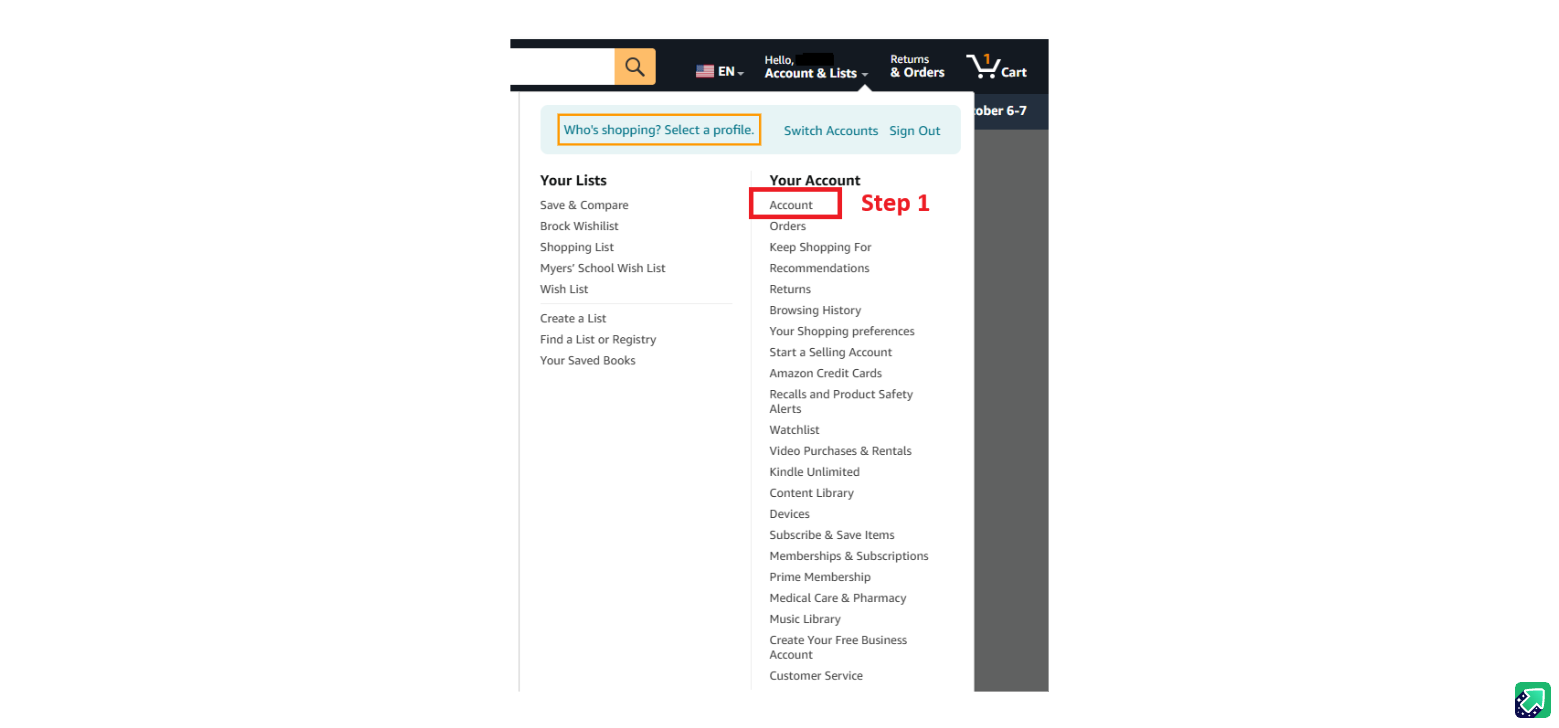
- Account & Lists → Account
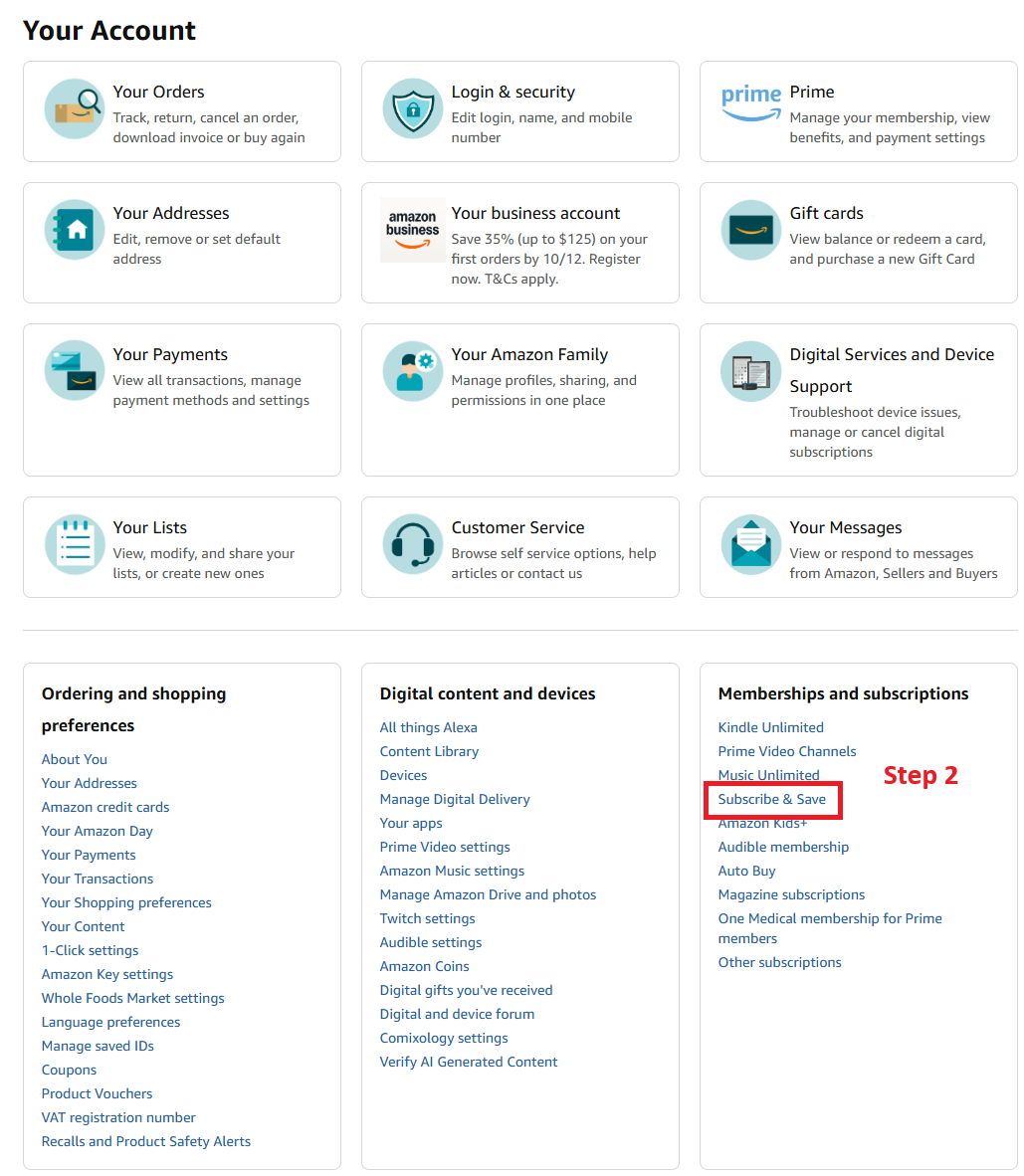
- Memberships and subscriptions → Subscribe & Save
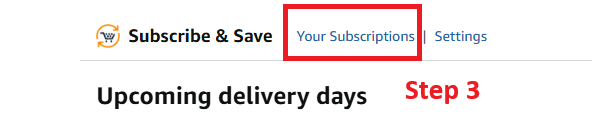
- Your Subscriptions
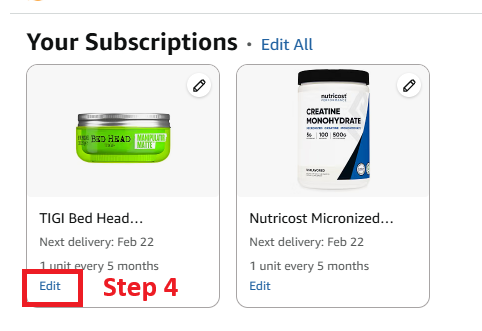
- Edit on the item you want to stop
- Cancel subscription
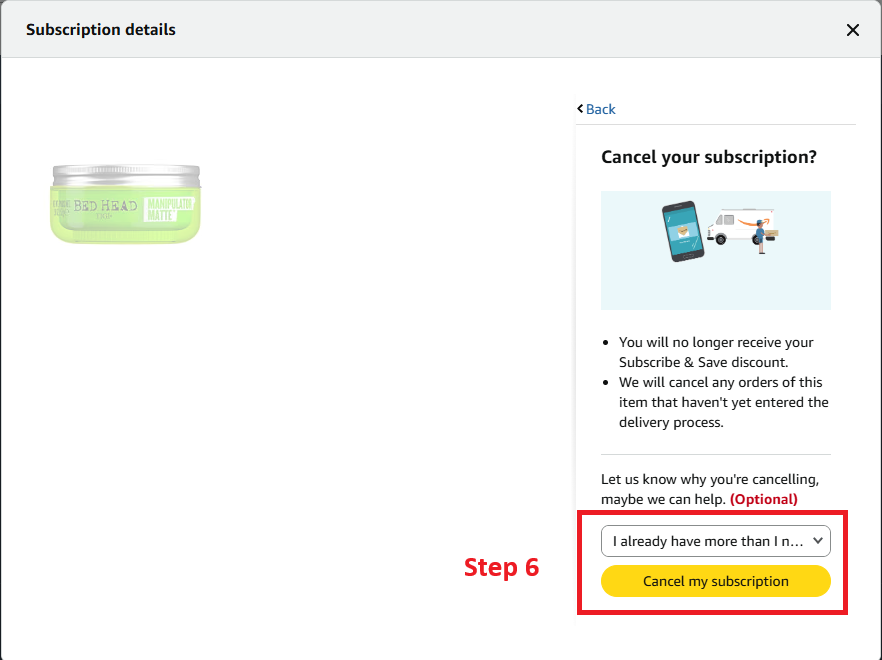
- Cancel my subscription (the reason is optional)
Do it before the next box is already in delivery. Official wording: Cancel Your Subscribe & Save Subscription.
Canceled the diaper run?
Check whether wipes, laundry, or pet food are still on autopilot.
Find my subscriptions — Continue with Google · Free discovery · No bank login · Works on mobile
Six screens
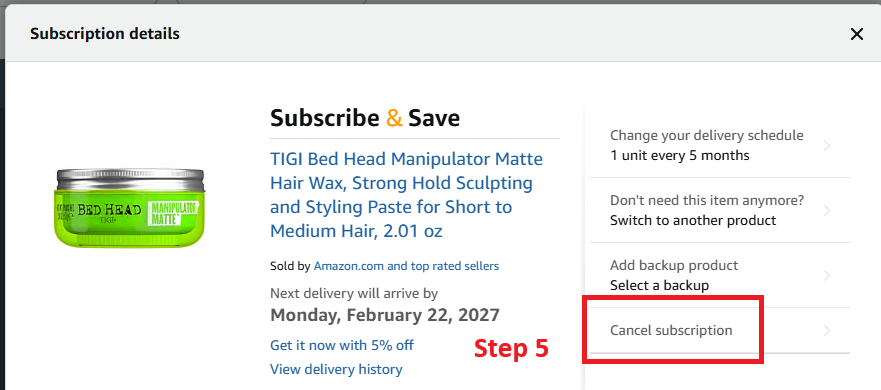
The red marks on these shots are the clicks. Follow them in order. The product in the later shots is just an example. Cancel the item you actually want to stop.
1. Open Account
2. Open Subscribe & Save
3. Open Your Subscriptions
4. Edit the item
5. Cancel subscription
6. Confirm
Timing: If a box is already in delivery, that shipment can still arrive. Later scheduled deliveries are what this cancel stops.
Skip ≠ cancel. Skipping one delivery leaves the subscription on. Finish on Cancel my subscription.
Also cancel the sibling items
While you’re in Subscribe & Save, search for:
- Baby wipes
- Diaper-pail liners / refill bags
- Old size variants (size 3 still active after you moved to size 5, then potty training)
Each SKU can be its own subscription.
Not Subscribe & Save? Other Amazon cancel doors
| What you have | Where to cancel |
|---|---|
| Product deliveries (diapers, paper, pet food) | Your Subscribe & Save |
| Digital / membership plans | Memberships and Subscriptions → Manage → Cancel Subscription |
| Prime | Prime End Membership — Cancel Amazon Prime |
| Signed up via Apple / Google | That store — see who’s billing you |
Full memberships walkthrough: Cancel subscriptions through Amazon.
Charged after you thought diapers were done
- Change made after the last update day?
- You skipped instead of canceled?
- Wipes or another size still active?
- Charge is Prime or something else, not S&S?
Keep screenshots → Charged after canceling.
FAQ
How do I cancel a diaper subscription on Amazon?
Your Subscribe & Save → Subscriptions → diapers → Cancel subscription → Cancel my subscription, before the last update day.
My child doesn’t need diapers anymore — will Amazon stop automatically?
No. Subscribe & Save keeps shipping until you cancel (or the listing ends). Outgrowing the product doesn’t cancel the plan.
Should I cancel wipes too?
Usually yes if you’re fully potty trained — wipes are often a separate subscription.
Is this the same as canceling Prime?
No. Ending Prime does not reliably cancel every Subscribe & Save item.
What else do people forget is on Subscribe & Save?
See the top 10 table above — pet food, paper goods, vitamins, laundry, and cleaning supplies are the usual leftovers.
Related guides
- Cancel subscriptions through Amazon
- Cancel Amazon Prime
- Charged after canceling
- Delete account ≠ cancel subscription
- Can’t find the cancel button?
- Cancel hub
Still not sure what’s renewing?
Free discovery · No bank login · Works on mobile
Continue with Google · No bank login