Category: Streaming

Streaming and video subscriptions.

  • How to Cancel Netflix (2026) — Account & Devices

    How to Cancel Netflix (2026 Guide)

    This guide covers how to cancel Netflix in the United States. Steps and fees can vary by account, club, and agreement — treat official help pages and your contract as the source of truth.

    Last checked 2026-10-18.

    Quick answer

    1. On a browser, open Netflix Manage your membership (sign in if asked).
    2. If you see Cancel → choose it → Finish Cancellation. Save the confirmation email.
    3. You can usually keep watching until the end of the billing period; you won’t be charged again unless you restart.
    4. If Cancel is missing, a payment partner bills you — cancel with that partner (Account → Membership section shows the link/instructions).
    5. Signing out or deleting the Netflix app does not cancel membership. Pause ≠ cancel.

    Canceling one service?

    See what else is still charging this Google account — free discovery, no bank login.

    Continue with Google · No bank login
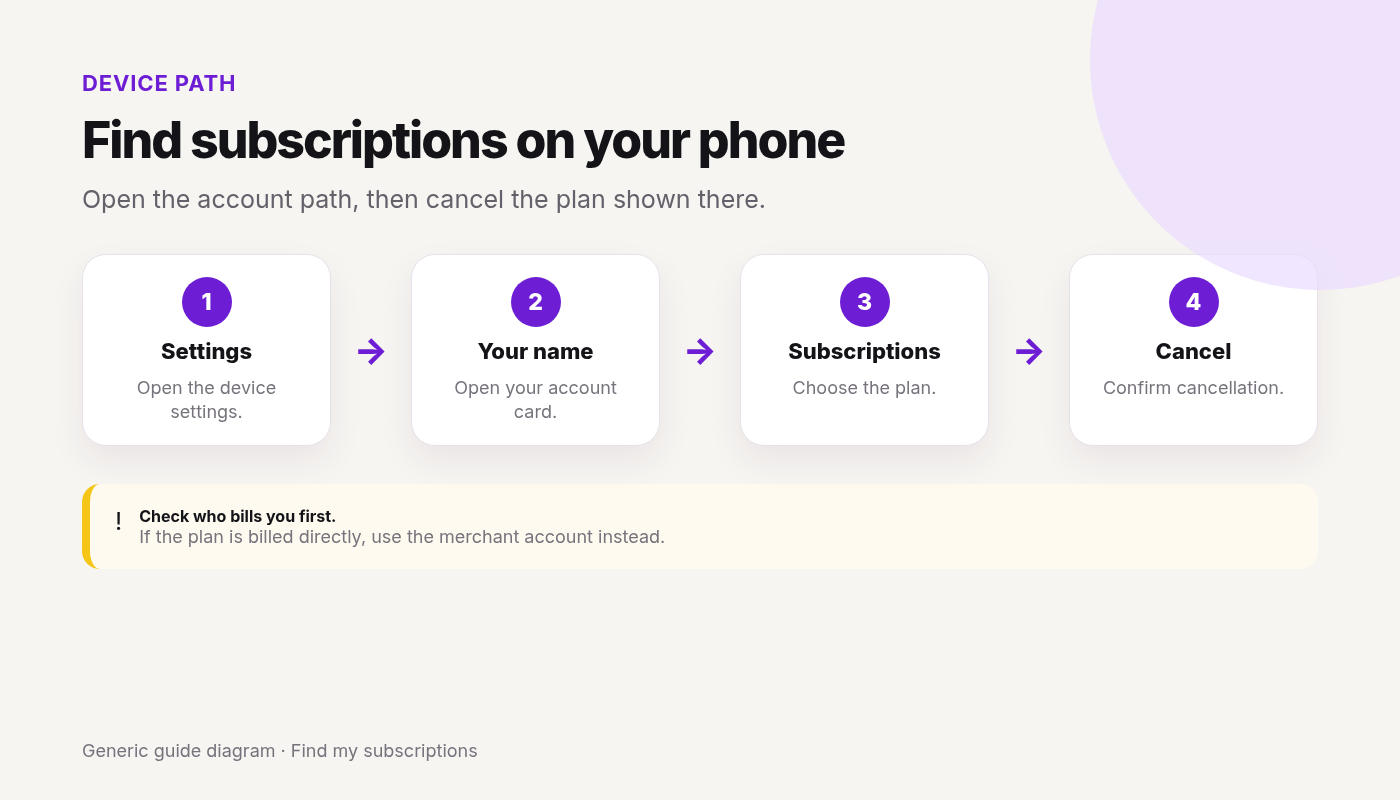
    Phone settings path showing how to open Subscriptions and cancel a store-billed streaming membership
    Cancel with the billed party — Apple Subscriptions if Apple bills you; Netflix Manage membership if Netflix bills you.

    Step-by-step: Cancel on Netflix.com (Netflix-billed)

    From Netflix Help (How to cancel Netflix):

    1. Go to the Manage your membership page (sign in if needed).
    2. Tap or click Cancel.
    3. Under Cancel, tap or click Finish Cancellation.
    4. Wait for the confirmation email on the account email address.
    5. Optionally re-open Account to confirm membership shows as canceled / ending on a date.

    Netflix Help: this Account cancel path is the way to end membership when Netflix bills you. Signing out or deleting the app does not cancel.

    Done canceling Netflix? Other subscriptions may still renew on this email.

    Find my subscriptions — Continue with Google · Free discovery · No bank login · Works on mobile

    Platform-specific paths

    If you don’t see Cancel on Netflix

    Per Netflix Help: cancel with your payment partner. Open your Account page → Membership section for a guided link or instructions to contact the partner.

    Apple / iPhone / Apple TV

    Netflix Help: Apple billing for Netflix is no longer available for most new or rejoining members, but some Apple-billed accounts remain.

    1. If Cancel is missing on Netflix and Membership points to Apple: cancel in Settings → [Your Name] → Subscriptions (or Apple ID subscriptions on Mac/TV).
    2. Cancel at least 24 hours before renewal per Apple’s rules (Netflix cites Apple’s policy).
    3. If you previously switched away from Apple billing, Netflix warns you may still need to cancel any leftover Apple Netflix subscription to avoid double charges.

    Google Play / Android

    If Google Play bills Netflix (or a related add-on):

    1. Play Store → Payments & subscriptions → Subscriptions → Netflix → Cancel.
    2. Uninstalling the app is not enough.

    Amazon / cable / mobile packages

    Partners (examples Netflix lists elsewhere include various ISP/cable/mobile packages) may put Netflix on their bill. Cancel or unlink per the Membership partner instructions. Switching to a package that includes Netflix: Netflix Help says you often link the existing account rather than cancel first — follow the package’s activate article so Netflix stops billing the old method.

    Roku and other devices

    Watching on a device ≠ that device always bills you. Check Account → Membership / payment. Cancel with Netflix or the partner that charges you.

    Fees, contracts, and money at risk

    • Netflix Help: cancel anytime; you won’t be charged again unless you restart.
    • If you cancel with time left in the billing period, you can use Netflix until the period ends.
    • Gift card / promo balance: after cancel, Netflix says you can keep using service for as many months as the remaining balance covers.
    • Separate “cancellation fee”: not described as a standard Netflix-billed cancel fee on the cancel help page — verify your confirmation. Partner contracts may differ.
    • Prorating: do not assume a mid-cycle refund unless Netflix or the partner states one.

    Charged after canceling

    1. Charge for the period already owed (watching until period end = often normal)?
    2. Partner / Apple / Google still billing while you only signed out of the app?
    3. Someone in the household used Restart Membership?
    4. Pause ended and billing resumed (pause ≠ cancel)?
    5. Gift-card months ended and a card on file restarted? (less common — check Account)
    6. Confirm with Netflix or the partner using the cancel email; change password + sign out of all devices if you need to block restarts (Netflix cancel help).

    Retention offers / pause vs cancel

    Netflix may offer Pause for 1 Month on the cancel page (not on Basic; not for some payment methods). Pause: keep watching until next billing date, then no charge for ~1 month, then billing resumes unless you extend/unpause/cancel. Pause ≠ cancel. You’re allowed to decline and choose Finish Cancellation.

    What you lose / what happens next (profiles / downloads)

    • Streaming and downloads for that membership end when the account cancels at period end (downloads may become unplayable when membership ends).
    • If you restart within 24 months, Netflix Help says your Viewing Activity, recommendations, ratings, account details, gameplay history, and game saves are still available.
    • Rejoin anytime via Account / sign-in restart flows.
    • To reduce household restarts: change password after cancel and check Sign out of all devices (per Netflix Help).

    One cancel done. What else are you paying for?

    After you finish this guide, see what other subscriptions may still be renewing.

    Continue with Google · No bank login

    FAQ

    How do I cancel Netflix on the website?

    Manage your membership → Cancel → Finish Cancellation → save the confirmation email.

    How do I cancel Netflix on iPhone?

    If Netflix bills you, use Manage your membership in Safari. If Apple bills you, cancel in Apple Subscriptions (Cancel may be missing on Netflix.com).

    Will I keep watching until the period ends?

    Yes for typical Netflix-billed cancels — use Netflix until the billing period ends; you won’t be charged again unless you restart.

    Is there a Netflix cancellation fee?

    Netflix Help describes cancel-anytime without a separate standard cancel fee for Netflix-billed memberships; you may finish the paid period. Partner billing may differ.

    Pause vs cancel — what’s the difference?

    Pause is temporary and billing can resume. Finish Cancellation ends the membership at period end.

    Why was I charged after canceling Netflix?

    Often remaining period, partner/store billing still active, pause instead of cancel, or someone restarted the account.

    Does deleting the Netflix app cancel my membership?

    No. Sign out doesn’t cancel either.

    How do I know cancellation worked?

    Confirmation email + Account status + no new unexpected charges after the stated end date.

    Related cancels

    Not legal advice. Steps change — verify on How to cancel Netflix.
  • How to Cancel DirecTV Stream (2026) — Account & Stores

    How to Cancel DirecTV Stream (2026 Guide)

    This guide covers how to cancel DirecTV Stream in the United States. Steps and fees can vary by account, club, and agreement — treat official help pages and your contract as the source of truth.

    Last checked 2026-10-28.

    Quick answer

    1. Check which DirecTV you have: over the internet (no satellite dish) or satellite dish. The cancel paths differ.
    2. Internet, billed by DirecTV: sign in at directv.com and select Cancel service, or chat on directv.com.
    3. Satellite dish: call 800.531.5000 to cancel.
    4. Your cancel takes effect on the last day of your billing cycle. You keep service until then, with no prorated refund.
    5. If Apple / Google Play / Amazon bills you, cancel there instead. Return any leased equipment to avoid a non-return fee.

    Canceling one service?

    See what else is still charging this Google account — free discovery, no bank login.

    Continue with Google · No bank login

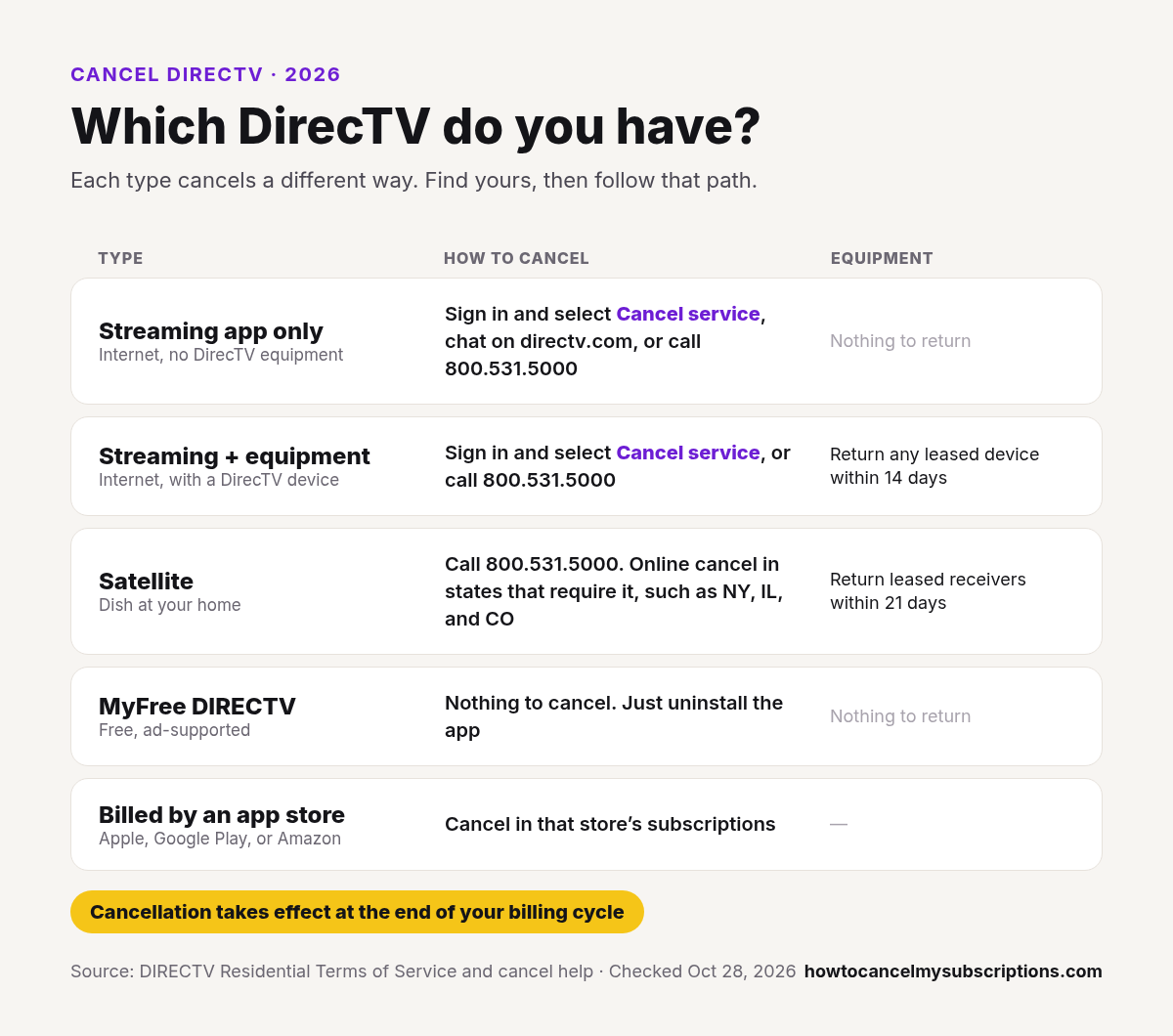
    Which DirecTV do you have?

    Which DirecTV do you have: how to cancel streaming only, streaming with equipment, satellite, MyFree DIRECTV, and app store billing, with equipment return deadlines of 14 and 21 days

    DirecTV’s Terms of Service split service into four types. DirecTV Stream is internet TV. DirecTV’s help pages now call it DirecTV “via internet.”

    • Streaming app only (internet, no DirecTV equipment): sign in and select Cancel service, chat on directv.com, or call 800.531.5000. No equipment, so nothing to return.
    • Streaming + DirecTV equipment (internet, with a DirecTV device): sign in and select Cancel service, or call 800.531.5000. Return any leased device within 14 days.
    • Satellite (dish at your home): call 800.531.5000. Online cancel is available in states that require it, such as NY, IL, and CO. Return leased receivers within 21 days.
    • MyFree DIRECTV (free, ad-supported): nothing to cancel and nothing to return. Just uninstall the app.
    • Billed by Apple, Google Play, or Amazon: cancel in that store’s subscriptions.

    Sources: Cancel help and Terms of Service, Section 4.

    Step-by-step: Cancel on the website (DirecTV-billed Stream)

    From DirecTV’s Cancel help:

    1. Sign in as the account owner at Account Overview.
    2. Select Cancel service.
    3. Follow prompts. If a chat or offer screen appears, finish it so the cancel actually posts. Don’t stop at the retention screen.
    4. Confirm status and keep the email DirecTV sends.
    5. You can keep watching through the end of your billing cycle.

    Phone: Cancel help lists 800.531.5000 for a “quick, personalized cancellation.” Under DirecTV’s Terms, Streaming + equipment and satellite customers cancel by phone unless their state requires online cancel.

    Done canceling DirecTV Stream? Other subscriptions may still renew on this email.

    Find my subscriptions — Continue with Google · Free discovery · No bank login · Works on mobile

    DirecTV billing cycle: when charges stop

    From DirecTV’s Terms of Service, Sections 4 and 7 and What happens after I cancel:

    • Cancel takes effect on the last day of the billing cycle in which you cancel. You keep service through that date and still owe any balance.
    • No prorated credit or refund for partial periods or content you didn’t watch, unless the law requires one.
    • Free trial (streaming app only): cancel before the trial ends. A free-trial cancel is immediate, and you won’t be charged.
    • Streaming + equipment, first 14 days: cancel by 7 PM EST on the 14th day after purchase. You pay no early termination fee, get the service cost refunded, and service ends immediately. Return all equipment for a full refund.
    • When you’re charged: streaming customers are charged on their Renewal Date. If that falls on the 29th, 30th, or 31st, the charge moves to the 1st of the next month. Satellite is billed in advance, with a statement usually every 30 days.
    • Streaming app only: you won’t get a separate monthly bill. Your due date is in your online account.
    • Add-ons: your TV package, add-ons, and streaming services through DirecTV are all canceled together.
    • After canceling: you can see your billing info for up to a year. You lose access to recordings.

    Equipment return after canceling

    From Return or recycle your DIRECTV equipment and Terms of Service, Section 5:

    • Leased equipment: return it in good condition to avoid a non-return fee or damaged equipment fee. Owned equipment is yours to keep.
    • Streaming + equipment: return leased equipment within 14 days of your cancel’s effective date. Use the USPS return label that came with the device. If you don’t have one, call 800.531.5000.
    • Satellite: return leased equipment within 21 days of the effective date. Take it to a FedEx Office Print & Ship Center or The UPS Store with your account number, or call 800.531.5000 for a box with a return label.
    • Keep: satellite dishes and other outside equipment, plus cords, cables, splitters, and switches.
    • Paying off a device in installments? If you cancel, the remaining balance is charged under your installment agreement.
    • Signed up for streaming + equipment before July 27, 2023? You don’t need to return equipment included in your package price.
    • DirecTV emails you if anything needs to go back.

    Platform-specific paths

    Always match cancel to who bills you (card statement, receipt email, or account payment line).

    Apple App Store / iPhone

    If you subscribed through Apple / in-app and Apple bills Stream (or a related add-on):

    1. iPhone: Settings → [Your Name] → Subscriptions.
    2. Select the DirecTV / Stream subscription → Cancel Subscription.
    3. Confirm; keep Apple’s confirmation. Canceling only inside the DirecTV app may not stop Apple billing.

    Google Play / Android

    If Google Play bills you:

    1. Open Google Play → profile → Payments & subscriptions → Subscriptions.
    2. Select DirecTV Stream → Cancel subscription.
    3. Uninstalling the app does not cancel Play billing.

    Amazon / Fire TV

    If Amazon bills the subscription (Amazon Appstore, Channels-style purchase, or Fire TV path):

    1. Open Amazon Memberships & Subscriptions (or Appstore subscriptions) for that purchase.
    2. Turn off auto-renew / unsubscribe.
    3. Confirm on both Amazon and your DirecTV account view when possible.

    Roku and other devices

    Watching on Roku ≠ Roku always bills you. Check the payment source. If Roku’s subscription list shows DirecTV, cancel there; otherwise use DirecTV account or the store that charged you.

    Fees, contracts, and money at risk

    From DirecTV’s Terms of Service, Section 4:

    • Early termination fee (ETF): applies only to customers on a 24-month agreement (a Term Commitment for streaming + equipment or satellite) who cancel early or don’t keep the required package. The maximum is $480, prorated at $20 per month left on that 24-month agreement. No 24-month agreement means no ETF.
    • DirecTV’s own example: a 24-month agreement canceled after 14 months leaves 10 months, so the fee is 10 × $20 = $200.
    • Existing satellite customers who added or upgraded leased equipment: $10 per remaining month of that commitment.
    • Lost discounts: canceling ends any promotional credits or discounts, and DirecTV can recoup prepaid credits.
    • Prepaid month blocks: for service sold in one-month blocks, you’re credited only for full unused months.
    • Leased equipment not returned: non-return fee (see above).

    Charged after canceling

    1. Was the charge for the billing cycle you canceled in? Service runs to the end of that cycle.
    2. Still billed by Apple/Google/Amazon while you only canceled on directv.com (or the reverse)?
    3. Chat or cancel flow started but not finished?
    4. Satellite vs Stream account mix-up?
    5. Leased equipment not returned in time, an ETF, or remaining device installments?
    6. Contact DirecTV or the billed store with confirmation; check Account Overview again.

    Retention offers

    Cancel help offers chat by reason (missing content, technical trouble, cost) and a Pause service option. Internet customers can sign in and select Pause service. Satellite customers call 800.531.5000. DirecTV says pausing is free, but you can’t watch while paused. Pause ≠ cancel. You can decline offers and finish canceling.

    What you lose / what happens next

    • Live TV / DVR / app streaming for that Stream subscription ends when the paid period ends.
    • You lose access to your recordings.
    • Add-ons and streaming services through DirecTV are canceled with your package.
    • If you restart later, your package price may be higher.
    • Keep confirmation until the next statement is clean.

    One cancel done. What else are you paying for?

    After you finish this guide, see what other subscriptions may still be renewing.

    Continue with Google · No bank login

    FAQ

    How do I cancel DirecTV?

    It depends on the type. Internet service with no dish: sign in at directv.com and select Cancel service, or chat. Satellite dish: call 800.531.5000. If Apple, Google Play, or Amazon bills you, cancel in that store.

    How do I cancel DirecTV Stream online?

    Sign in as the account owner at directv.com, select Cancel service, finish any chat or offer screens, and save the confirmation email.

    How do I cancel DirecTV satellite?

    Call 800.531.5000. DirecTV’s Terms say satellite customers cancel by phone. Online cancel is available in states that require it, such as NY, IL, and CO.

    How do I disconnect DirecTV?

    Contact DirecTV to disconnect service before you return any equipment, either online through Cancel service or by calling 800.531.5000. Then return any leased equipment: within 14 days for streaming with equipment, or 21 days for satellite.

    How does the DirecTV billing cycle work when I cancel?

    Your cancel takes effect on the last day of the billing cycle in which you cancel. You keep service until then, and there is no prorated credit or refund for the partial period unless the law requires one.

    How do I cancel DirecTV Stream on iPhone?

    If Apple bills you, cancel in Apple Subscriptions. If DirecTV bills you, use the website/account path (mobile browser is fine).

    Is there a DirecTV Stream cancellation fee?

    Only if you’re on a 24-month agreement (a Term Commitment). DirecTV’s Terms set the early termination fee at up to $480, prorated at $20 per remaining month of that 24-month agreement. With no 24-month agreement, there’s no ETF. You can also be charged a non-return fee for leased equipment you don’t send back.

    Do I have to return DirecTV equipment?

    Return leased equipment to avoid a non-return fee. Owned equipment, satellite dishes, and cables are yours to keep. DirecTV emails you if anything needs to go back.

    Can I cancel by phone?

    Yes. DirecTV’s Cancel help page lists 800.531.5000.

    Pause vs cancel?

    Pausing is free and keeps your account, but you can’t watch while paused. Canceling ends service at the end of your billing cycle.

    Why was I charged after canceling DirecTV Stream?

    Often remaining cycle, unfinished chat cancel, or store billing still active.

    How do I know it worked?

    Account status + confirmation email + no new unexpected charges after the stated end date.

    Related cancels

    Not legal advice. Steps change — verify on DirecTV’s Cancel help and Terms of Service.

  • How to Cancel Hulu (2026) — Account, Apple, Google & Amazon

    How to Cancel Hulu (2026) — Account, Apple, Google & Amazon

    How to Cancel Hulu (2026 Guide)

    This guide covers how to cancel Hulu in the United States. Steps and fees can vary by account, club, and agreement — treat official help pages and your contract as the source of truth.

    Quick answer

    1. Open your Hulu Account page and check Payment Information (who bills you).
    2. If Hulu bills you: Account → Cancel under Your Subscription → Continue to Cancel (skip pause if offered) → Cancel Subscription.
    3. Status should read that your subscription will be canceled; save the confirmation email. Access usually continues through the current billing period.
    4. If a third party bills you (Apple, Google, Amazon, Roku partner, etc.): cancel with that provider — wrong door = still charged.
    5. Free trial: cancel before trial end to avoid the first paid charge.

    Canceling one service?

    See what else is still charging this Google account — free discovery, no bank login.

    Continue with Google · No bank login

    Step-by-step: Cancel on the website (Hulu-billed)

    From a computer or mobile browser (Hulu Help):

    1. Go to secure.hulu.com/account and sign in.
    2. Under Your Subscription, select Cancel.
    3. If offered a pause, select Continue to Cancel if you want billing to stop.
    4. Select Cancel Subscription.
    5. Confirm status shows the subscription will be canceled; keep the email Hulu sends.

    Done canceling Hulu? Other subscriptions may still renew on this email.

    Find my subscriptions — Continue with Google · Free discovery · No bank login · Works on mobile

    Platform-specific paths

    Confirm billed party on Account → Payment Information before you pick a path. Wrong door = still charged.

    Detailed forks (mid-tail H2s below):

    Fees, contracts, and money at risk

    • Hulu-billed plans: cancel anytime per Hulu Help; you typically keep access through the current billing period with no further charges.
    • Free trial: cancel during trial to avoid conversion to paid.
    • Bundles (e.g. with other Disney products): cancel the subscription/bundle you actually pay for — one cancel may not cover every product.
    • Prorating: check your confirmation email.

    Charged after canceling

    Often: current period already billed, Apple/Google/Amazon still active, Disney Bundle still on, or pause instead of cancel. Full checklist: Charged after canceling Hulu.

    Retention offers

    Hulu may offer pause or a discount. You’re allowed to decline and continue to Cancel Subscription.

    What you lose / what happens next

    • Streaming access ends when the current period (or trial) ends.
    • Canceling ≠ deleting your account. Delete only after cancel if you want that — deleting first can block cancel flows.
    • Profiles/watch lists follow Hulu’s account rules; cancel alone usually keeps the login for later resubscribe.

    Cancel Hulu on iPhone

    Use this when Apple bills Hulu (Payment Information shows Apple / App Store).

    1. Open Settings → [Your Name] → Subscriptions (or Apple’s subscriptions manage page on the web).
    2. Tap the Hulu subscription.
    3. Choose Cancel Subscription and confirm.
    4. Keep Apple’s confirmation; check Hulu Account still reflects the end date.
    5. Canceling only inside the Hulu app / website does not stop Apple billing.

    If Payment Information shows Hulu (not Apple), use the website cancel path instead — iPhone Safari works fine.

    Cancel Hulu on Google Play

    Use this when Google Play bills Hulu.

    1. Open the Play Store → profile → Payments & subscriptions → Subscriptions.
    2. Select Hulu → Cancel subscription.
    3. Keep Google’s confirmation email.
    4. Uninstalling the Hulu app does not cancel Play billing.

    If Payment Information shows Hulu directly, cancel on secure.hulu.com/account instead.

    Cancel Hulu Amazon

    If Amazon bills the Hulu plan (Fire TV / Amazon subscription purchase):

    1. Open Amazon Memberships & Subscriptions (or the subscription manage page for that purchase).
    2. Find Hulu → turn off auto-renew / cancel.
    3. Confirm Hulu Payment Information no longer expects Amazon renewal.
    4. App-only cancel while Amazon still bills is a common charged-after-cancel cause.

    Cancel Hulu on Roku

    Confirm Payment Information first. For many Roku-related Hulu charges, Hulu still manages the subscription even if Roku processes payment.

    1. Start with the Hulu Account cancel path and keep Hulu’s confirmation.
    2. If Hulu points you to Roku, use Roku manage subscriptions and keep that proof too.
    3. Device “manage subscription” is a secondary check — Hulu confirmation is usually the source of truth when Hulu says they manage billing.

    Sources: Hulu cancel · Hulu third-party billing · Roku manage subscriptions

    Cancel Disney Bundle Hulu

    If you pay for a Disney Bundle (Hulu + Disney+ / ESPN+ variants):

    1. Identify the bundle or plan you actually pay for and who bills it (Disney, Hulu, Apple, etc.).
    2. Cancel that bundle through the billed party’s subscription settings.
    3. Canceling “Hulu alone” inside one app may not end the whole bundle — and canceling the bundle may remove more than Hulu.
    4. Check each product’s account page after cancel so nothing unexpected renews.

    Pause vs cancel Hulu

    Hulu’s cancel flow may offer to pause instead of ending billing.

    • Pause is temporary — charges can resume when the pause ends.
    • To stop billing: choose Continue to Cancel → Cancel Subscription.
    • Keep the confirmation email. Account status should show canceled, not paused.
    • Decline retention offers if your goal is to leave.

    Charged after canceling Hulu

    1. Was the charge for the period you already paid (access continuing through period end = normal)?
    2. Still billed by Apple / Google / Amazon while you only canceled in Hulu (or the reverse)?
    3. Disney Bundle or add-on still active?
    4. Chose pause instead of Cancel Subscription?
    5. Confirmation email missing — cancel may not have finished?
    6. Contact Hulu or the billed party with your confirmation; re-check Payment Information.

    Live TV / Change Plan vs cancel

    Change Plan (dropping Live TV or add-ons) ≠ canceling the entire subscription. Use Cancel Subscription to stop all Hulu charges on that plan.

    One cancel done. What else are you paying for?

    After you finish this guide, see what other subscriptions may still be renewing.

    Continue with Google · No bank login

    FAQ

    How do I cancel Hulu online?

    Use the Account page in a browser: Cancel under Your Subscription → Cancel Subscription.

    How do I cancel Hulu on iPhone?

    If Apple bills you, cancel in Apple Subscriptions. If Hulu bills you, use the Account cancel path in Safari.

    How do I cancel Hulu on Google Play?

    Play Store → Payments & subscriptions → Subscriptions → Hulu → Cancel. Uninstalling the app is not enough.

    How do I cancel Hulu on Roku or Amazon?

    Match the billed party: Hulu Account, Roku subscriptions, or Amazon Memberships & Subscriptions — then save confirmation.

    How do I cancel a Disney Bundle that includes Hulu?

    Cancel the bundle through whoever bills it; canceling Hulu alone may not end the bundle.

    Pause vs cancel — what’s the difference?

    Pause is temporary and can resume charges. Continue to Cancel → Cancel Subscription to stop billing.

    Is there a Hulu cancellation fee?

    Hulu Help describes cancel-anytime for Hulu-billed subs; you generally aren’t charged a separate cancel fee — you may simply finish the paid period. Verify on your plan/confirmation.

    Why was I charged after canceling Hulu?

    Often period already started, third-party billing still active, Disney Bundle still on, or pause instead of cancel.

    How do I know Hulu cancellation worked?

    Account status + confirmation email; no new charges after the stated end date.

    Related cancels

    Not legal advice. Steps change — verify on Hulu Help.